mirror of
https://github.com/next-theme/hexo-theme-next.git
synced 2026-01-17 18:22:33 +00:00

169 lines
8.4 KiB
Markdown
169 lines
8.4 KiB
Markdown
<div align="right">
|
||
Язык:
|
||
<a title="Английский" href="../../README.md">🇺🇸</a>
|
||
<a title="Китайский" href="../zh-CN/README.md">🇨🇳</a>
|
||
🇷🇺
|
||
</div>
|
||
|
||
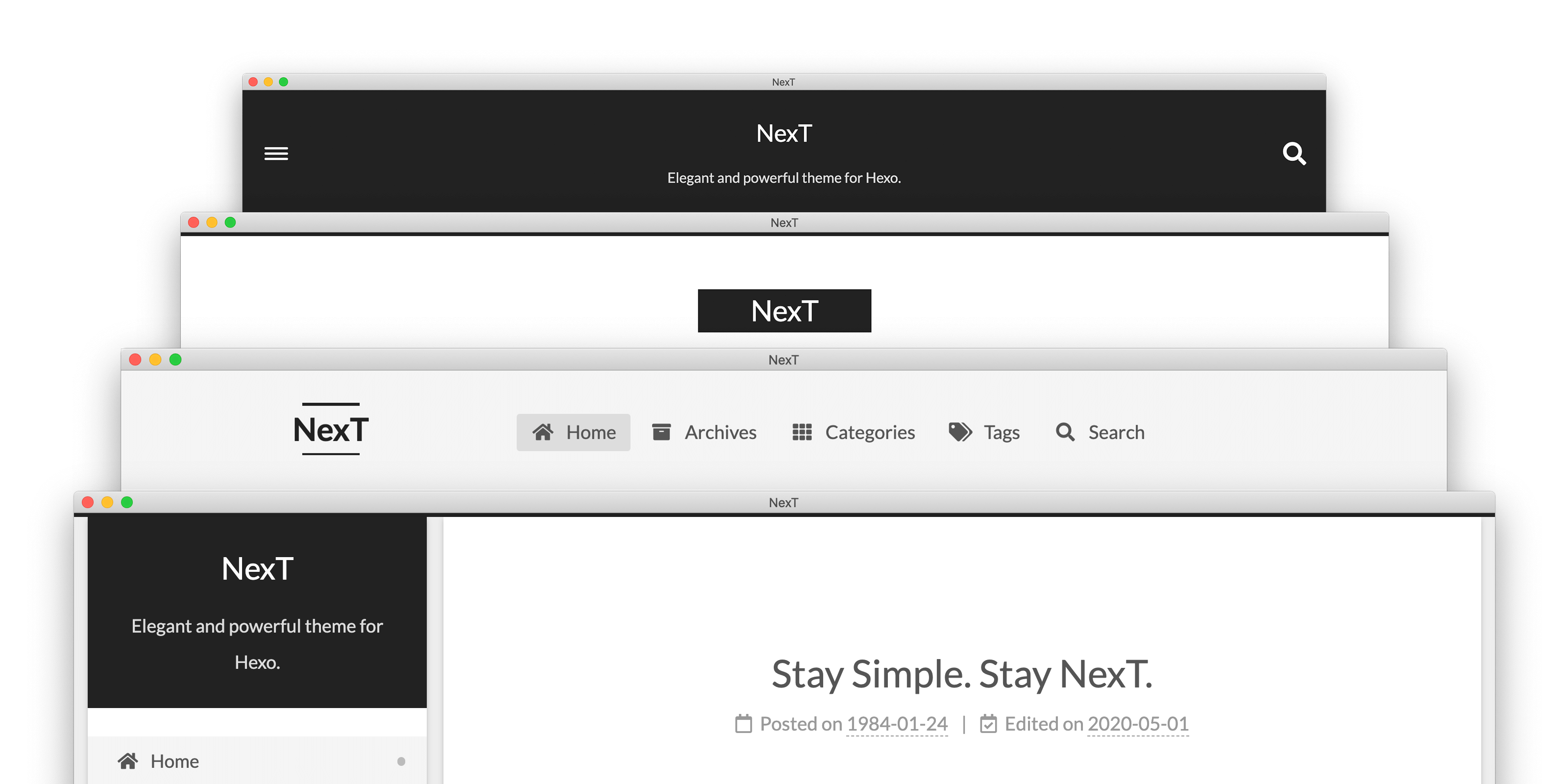
|
||
|
||
<a title="NexT website" href="https://theme-next.js.org"><img align="right" alt="NexT logo" width="100" height="100" src="https://raw.githubusercontent.com/next-theme/hexo-theme-next/master/source/images/logo.svg?sanitize=true"></a>
|
||
|
||
# NexT
|
||
|
||
> «NexT» — элегантная высококачественная тема под [Hexo](https://hexo.io). Сделана с нуля, с любовью.
|
||
|
||
[](https://www.npmjs.com/package/hexo-theme-next)
|
||
[](https://hexo.io)
|
||
[](https://github.com/next-theme/hexo-theme-next/blob/master/LICENSE.md)
|
||
[](https://lgtm.com/projects/g/next-theme/hexo-theme-next/)
|
||
[](https://github.com/next-theme/hexo-theme-next/actions?query=workflow%3ALinter)
|
||
[](https://github.com/next-theme/hexo-theme-next/actions?query=workflow%3ATester)
|
||
|
||
## Демо
|
||
|
||
<p align="center">
|
||
💟 <a href="https://theme-next.js.org/muse/">Muse</a> | 🔯 <a href="https://theme-next.js.org/mist/">Mist</a> | ♓️ <a href="https://theme-next.js.org/pisces/">Pisces</a> | ♊️ <a href="https://theme-next.js.org">Gemini</a>
|
||
<br>
|
||
<br>
|
||
Больше примеров «NexT» <a href="https://github.com/next-theme/awesome-next#live-preview">здесь</a>.
|
||
</p>
|
||
|
||
## Установка
|
||
|
||
If you're using Hexo 5.0 or later, the simplest way to install is through npm:
|
||
|
||
```sh
|
||
$ cd hexo-site
|
||
$ npm install hexo-theme-next
|
||
```
|
||
|
||
Or you can clone the entire repository:
|
||
|
||
```sh
|
||
$ cd hexo-site
|
||
$ git clone https://github.com/next-theme/hexo-theme-next themes/next
|
||
```
|
||
|
||
See [detailed installation instructions][docs-installation-url] if you want any other variant.
|
||
|
||
After the installation, open Hexo config file and set `theme` variable to `next`.
|
||
|
||
```yml
|
||
theme: next
|
||
```
|
||
|
||
## Configuration
|
||
|
||
At present, NexT encourages users to use the [Alternate Theme Config][docs-configuration-url] to configure NexT. And it's easy to customize the layout or style of NexT using [Custom Files][docs-custom-files-url].
|
||
|
||
It is not recommended to directly modify any files in the NexT theme. Because this may cause errors (e.g. merge conflicts), and the modified files may be discarded when upgrading the theme.
|
||
|
||
However, you can bypass merge conflicts (error message like **«Commit your changes or stash them before you can merge»**) by using the `Commit`, `Stash` or `Reset` commands for local changes. See [here](https://stackoverflow.com/a/15745424/5861495) how to do it.
|
||
|
||
## Плагины
|
||
|
||
Plugins extend and expand the functionality of NexT. There are two types of plugins: core plugins and third-party plugins. The core plugins are required by the basic functions of NexT. Third-party plugins provide a large number of optional features.
|
||
|
||
Configuring these plugins is very easy. Например, Вы хотите использовать `pjax` для своего сайта. Открываем конфиг NexT'а и находим:
|
||
|
||
```yml
|
||
# Easily enable fast Ajax navigation on your website.
|
||
# For more information: https://github.com/next-theme/pjax
|
||
pjax: true
|
||
```
|
||
|
||
### Configure CDN
|
||
|
||
Third-party plugins are loaded from [jsDelivr](https://www.jsdelivr.com) CDN by default. We also provide other optional CDNs, including the famous [UNPKG](https://unpkg.com) and [CDNJS](https://cdnjs.com).
|
||
|
||
For example, if you want to use `unpkg` instead of `jsdelivr` as the default CDN provider, you need to edit the following settings in NexT config file:
|
||
|
||
```yml
|
||
vendors:
|
||
# ...
|
||
# Some contents...
|
||
# ...
|
||
plugins: unpkg
|
||
```
|
||
|
||
## Обновление
|
||
|
||
NexT выпускает новые версии каждый месяц. You can update NexT by the following command.
|
||
|
||
Install the latest version throuth npm:
|
||
|
||
```sh
|
||
$ cd hexo-site
|
||
$ npm update hexo-theme-next
|
||
```
|
||
|
||
Or update to latest master branch:
|
||
|
||
```sh
|
||
$ cd themes/next
|
||
$ git pull
|
||
```
|
||
|
||
А если всплывают ошибки во время обновления (что-то наподобии **«Commit your changes or stash them before you can merge»**), рекомендуется ознакомиться с особенностью хранения [Alternate Theme Config][docs-configuration-url].\
|
||
Как бы то ни было, можно обойти ошибки при обновлении если «Закомитить», «Стэшнуть» или «Откатить» локальные изменения. Смотрим [здесь](https://stackoverflow.com/a/15745424/5861495) как это сделать.
|
||
|
||
**Если нужно обновиться с версии v5.x / v7.x на последней версиями, читаем [здесь][docs-update-5-1-x-url].**
|
||
|
||
## Обратная связь
|
||
|
||
* Посетите [Awesome NexT][awesome-next-url] список.
|
||
* Вступить в наши [Gitter][gitter-url] чаты.
|
||
* [Добавить или улучшить перевод][i18n-url] за несколько секунд.
|
||
* Сообщить об ошибке в разделе [GitHub Issues][issues-bug-url].
|
||
* Запросить новую возможность на [GitHub][issues-feat-url].
|
||
* Голосовать за [популярные запросы возможностей][feat-req-vote-url].
|
||
|
||
## Contributing
|
||
|
||
We welcome you to join the development of NexT. Please see [contributing document][contributing-document-url]. 🤗
|
||
|
||
Also, we welcome Issue or PR to our [official-plugins][official-plugins-url].
|
||
|
||
## Содействие
|
||
|
||
[![Contributors][contributors-image]][contributors-url]
|
||
|
||
## Благодарности
|
||
|
||
«NexT» send special thanks to these great services that sponsor our core infrastructure:
|
||
|
||
<a href="https://github.com"><img height="40" src="https://github.githubassets.com/images/modules/logos_page/GitHub-Logo.png"></a>
|
||
|
||
> GitHub allows us to host the Git repository and run the test suite.
|
||
|
||
<a href="https://www.netlify.com"><img height="40" src="https://www.netlify.com/img/press/logos/full-logo-light.svg"></a>
|
||
|
||
> Netlify allows us to distribute the documentation.
|
||
|
||
<a href="https://crowdin.com"><img height="40" src="https://support.crowdin.com/assets/logos/crowdin-logo-small-black.svg"></a>
|
||
|
||
> Crowdin allows us to translate conveniently the documentation.
|
||
|
||
<a href="https://www.jsdelivr.com"><img height="40" src="https://raw.githubusercontent.com/jsdelivr/jsdelivr-media/master/default/svg/jsdelivr-logo-horizontal.svg"></a>
|
||
|
||
> Thanks jsDelivr for providing public CDN service.
|
||
|
||
[docs-installation-url]: https://theme-next.js.org/docs/getting-started/installation.html
|
||
[docs-configuration-url]: https://theme-next.js.org/docs/getting-started/configuration.html
|
||
[docs-custom-files-url]: https://theme-next.js.org/docs/advanced-settings/custom-files.html
|
||
[docs-update-5-1-x-url]: https://theme-next.js.org/docs/getting-started/update-from-v5.html
|
||
|
||
[gitter-url]: https://gitter.im/hexo-next
|
||
[i18n-url]: https://crowdin.com/project/hexo-theme-next
|
||
|
||
[awesome-next-url]: https://github.com/next-theme/awesome-next
|
||
[issues-bug-url]: https://github.com/next-theme/hexo-theme-next/issues/new?assignees=&labels=Bug&template=bug-report.md
|
||
[issues-feat-url]: https://github.com/next-theme/hexo-theme-next/issues/new?assignees=&labels=Feature+Request&template=feature-request.md
|
||
[feat-req-vote-url]: https://github.com/next-theme/hexo-theme-next/issues?q=is%3Aopen+is%3Aissue+label%3A%22Feature+Request%22
|
||
|
||
[contributing-document-url]: https://github.com/next-theme/hexo-theme-next/blob/master/.github/CONTRIBUTING.md
|
||
[official-plugins-url]: https://github.com/next-theme
|
||
[contributors-image]: https://raw.githubusercontent.com/next-theme/contributors/master/contributors.svg
|
||
[contributors-url]: https://github.com/next-theme/hexo-theme-next/blob/master/docs/AUTHORS.md
|