# 
e x T
«NexT» — элегантная высококачественная тема под Hexo. Сделана с нуля, с любовью.





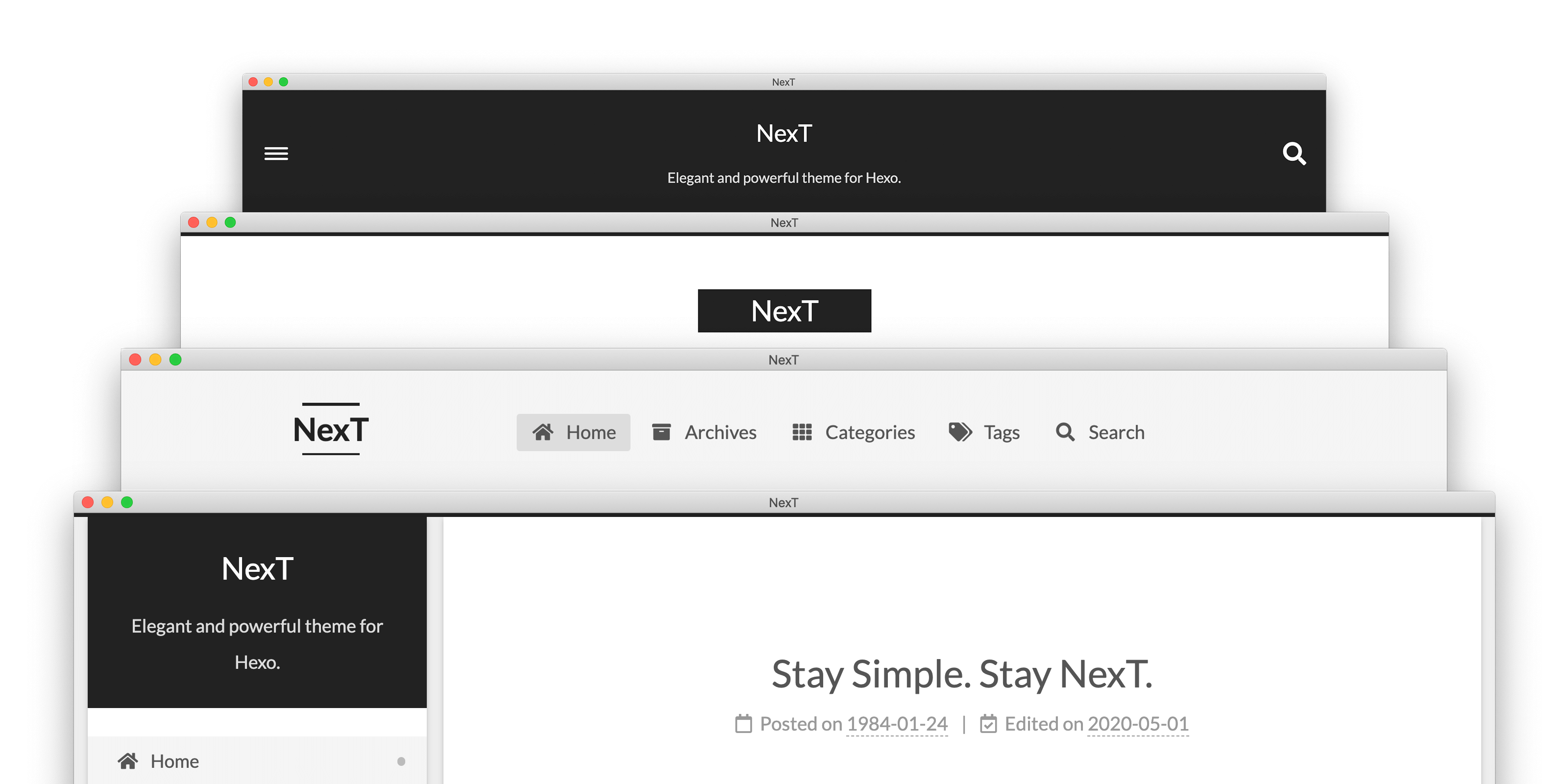
## Демо
💟 Muse | 🔯 Mist | ♓️ Pisces | ♊️ Gemini
Больше примеров «NexT» здесь.
## Установка
Простейший вариант установки — склонировать весь репозиторий:
```sh
$ cd hexo
$ git clone https://github.com/next-theme/hexo-theme-next themes/next
```
Или предлагаю почитать [детальные инструкции по установке][docs-installation-url], если вариант выше не устраивает.
## Плагины
Plugins extend and expand the functionality of NexT. There are two types of plugins: core plugins and third-party plugins. The core plugins are required by the basic functions of NexT. Third-party plugins are loaded from jsDelivr CDN by default, and they provide a large number of optional features.
Configuring these plugins is very easy. Например, Вы хотите использовать `pjax` для своего сайта. Открываем конфиг NexT'а и находим:
```yml
# Easily enable fast Ajax navigation on your website.
# For more information: https://github.com/next-theme/pjax
pjax: true
```
### Configure CDN
If you want to specify the CDN provider for any plugins, you need to set / update the CDN URL.
For example, if you want to set the CDN URL for `mediumzoom`, go to NexT config and see:
```yml
vendors:
# ...
# Some contents...
# ...
mediumzoom: # Set or update mediumzoom CDN URL.
```
## Обновление
NexT выпускает новые версии каждый месяц. Можно обновить до последней мастер-ветки следующей командой:
```sh
$ cd themes/next
$ git pull
```
А если всплывают ошибки во время обновления (что-то наподобии **«Commit your changes or stash them before you can merge»**), рекомендуется ознакомиться с особенностью хранения [Alternate Theme Config][docs-data-files-url].\
Как бы то ни было, можно обойти ошибки при обновлении если «Закомитить», «Стэшнуть» или «Откатить» локальные изменения. Смотрим [здесь](https://stackoverflow.com/a/15745424/5861495) как это сделать.
**Если нужно обновиться с версии v5.x / v7.x на последней версиями, читаем [здесь][docs-update-5-1-x-url].**
## Обратная связь
* Посетите [Awesome NexT][awesome-next-url] список.
* Вступить в наши [Gitter][gitter-url] чаты.
* [Добавить или улучшить перевод][i18n-url] за несколько секунд.
* Сообщить об ошибке в разделе [GitHub Issues][issues-bug-url].
* Запросить новую возможность на [GitHub][issues-feat-url].
* Голосовать за [популярные запросы возможностей][feat-req-vote-url].
## Содействие
- [iissnan/hexo-theme-next](https://github.com/iissnan/hexo-theme-next/graphs/contributors)
- [theme-next/hexo-theme-next](https://github.com/theme-next/hexo-theme-next/graphs/contributors)
- [next-theme/hexo-theme-next](https://github.com/next-theme/hexo-theme-next/graphs/contributors)
Приветсвуется любое содействие, не стесняйтесь сообщать «Баги», брать «Форки» и вливать «Пулы».
## Благодарности
«NexT» выражает особую благодарность этим замечательным сервисам, которые спонсируют нашу основную инфраструктуру:


GitHub позволяет нам хостить Git-репозиторий, Netlify позволяет нам деплоить документацию.

Crowdin позволяет нам удобно переводить документацию.
[docs-installation-url]: https://theme-next.js.org/docs/getting-started/installation.html
[docs-data-files-url]: https://theme-next.js.org/docs/getting-started/configuration.html
[docs-update-5-1-x-url]: https://theme-next.js.org/docs/getting-started/update-from-v5.html
[gitter-url]: https://gitter.im/hexo-next
[i18n-url]: https://crowdin.com/project/hexo-theme-next
[awesome-next-url]: https://github.com/next-theme/awesome-next
[issues-bug-url]: https://github.com/next-theme/hexo-theme-next/issues/new?assignees=&labels=Bug&template=bug-report.md
[issues-feat-url]: https://github.com/next-theme/hexo-theme-next/issues/new?assignees=&labels=Feature+Request&template=feature-request.md
[feat-req-vote-url]: https://github.com/next-theme/hexo-theme-next/issues?q=is%3Aopen+is%3Aissue+label%3A%22Feature+Request%22
[contributing-document-url]: https://github.com/next-theme/hexo-theme-next/blob/master/.github/CONTRIBUTING.md
[official-plugins-url]: https://github.com/next-theme